
Protocol Perspective
Understand the MCP lifecycle, JSON-RPC 2.0 message flow, and transport selection criteria, and explain why the handshake is the starting point of governance.
Protocol Perspective
Understand the MCP lifecycle, JSON-RPC 2.0 message flow, and transport selection criteria, and explain why the handshake is the starting point of governance.
Architecture Perspective
Understand the Host-Client-Server topology, the three server primitives (Tools/Resources/Prompts), and the reverse flow of Client Features (Sampling/Roots/Elicitation).
Governance Perspective
Explain how to control agent tool access using TBAC/OBO/Triple Gate patterns, and distinguish the difference from RBAC.
Implementation Perspective
Implement a Tool+Resource+Prompt server with FastMCP, validate with MCP Inspector, and apply input validation and safe error returns.
The governance we designed in Week 2 is logical policy — a rule like “this agent cannot delete files.” But for a policy to actually work, physical isolation and a standard protocol are needed. This week we establish these two layers, with MCP as the central axis.
MCP is the USB-C of AI. Just as USB-C unified printers, monitors, and external drives into a single port, MCP connects filesystems, Git, databases, and APIs through a single protocol. It standardizes integration methods that used to differ by vendor, providing a common interface for agents to discover and call tools.
Let’s clearly separate the two layers:
MCP’s status was decisively established in December 2025 when Anthropic donated MCP to the Linux Foundation AI & Data (AAIF). OpenAI, Google, and Microsoft joined, making it the de facto industry standard. In Week 4’s loop paradigm, when agents autonomously write code, MCP controls tool access, MIG isolates computing, and Week 2’s governance sets approval boundaries — these three layers must work together.
MIG provides physical isolation, but MCP determines what the agent can do. This section covers the core concepts of MIG, and from the next section we dive deep into MCP.
Imagine 30 students sharing the same GPU. If student A accidentally runs an infinite loop or triggers OOM (Out of Memory), students B and C using the same GPU are also affected. Traditional time-slicing alternates GPU time-sharing, but it does not separate memory or cache.
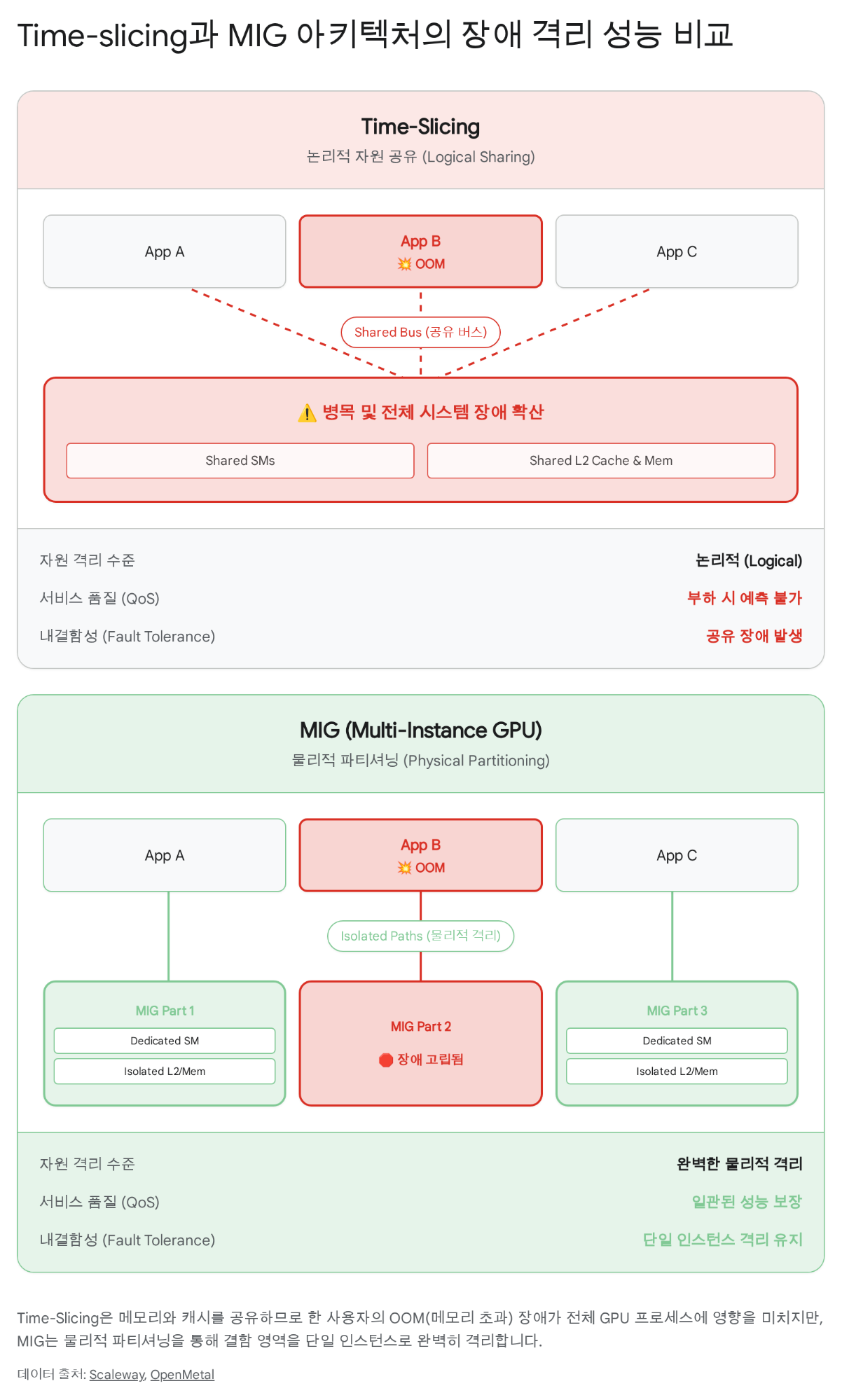
The diagram shows the key point:
Cheju Halla University’s AI lab DGX H100 has 8 GPUs. With each GPU split into 7 slices in MIG mode:
8 GPUs × 7 slices = 56 independent instances
That’s enough to assign one MIG instance (1g.10gb) to each of the 30 students with 26 to spare.
MIG partitioning happens in two stages:
In an educational environment, 1 GI = 1 CI mapping is the simplest and safest.
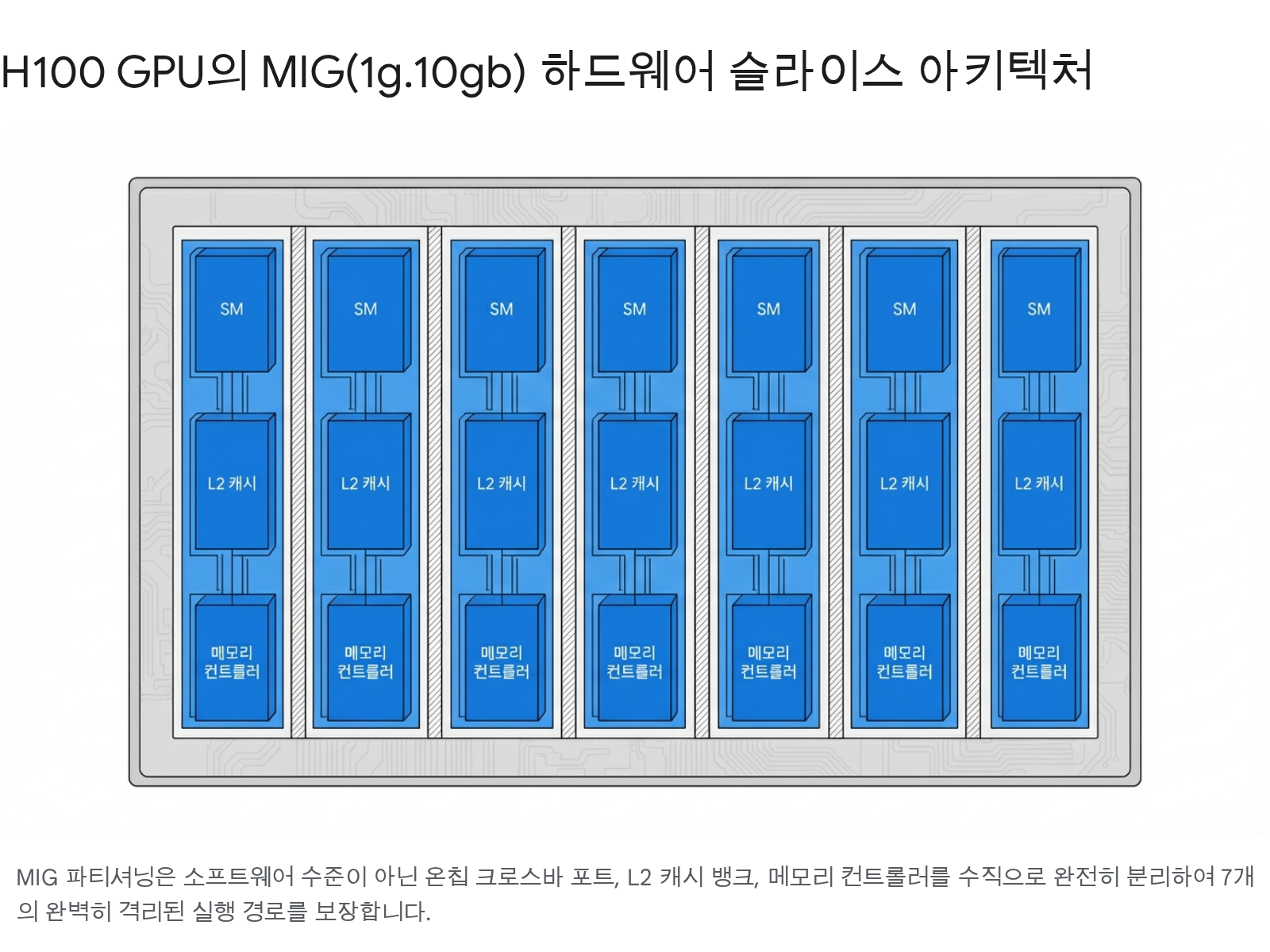
| Profile | SM Count | GPU Memory | Max Instances | Best Use |
|---|---|---|---|---|
1g.10gb | ~16 SM | 10GB HBM3 | 7 | Lab work, small model inference |
2g.20gb | ~32 SM | 20GB HBM3 | 3 | Mid-scale inference, fine-tuning |
3g.40gb | ~48 SM | 40GB HBM3 | 2 | Large-scale inference, quantized LLM |
4g.40gb | ~64 SM | 40GB HBM3 | 1 | High-performance research workloads |
7g.80gb | 132 SM | 80GB HBM3 | 1 | Full GPU (no partitioning) |
Hardware-level partitioning
| Item | Detail |
|---|---|
| Isolation level | Physical separation of SM, L2 cache, memory controllers |
| Fault isolation | Complete — one partition’s OOM has no effect on others |
| QoS guarantee | Predictable latency, consistent throughput |
| Reconfiguration | Requires GPU reset (takes a few seconds) |
| Suitable for | Education, multi-tenant inference, security-sensitive environments |
Time-division multiplexing
| Item | Detail |
|---|---|
| Isolation level | Logical — shares full GPU in time order |
| Fault isolation | None — OOM affects all users |
| QoS guarantee | Unstable — performance varies with other workloads |
| Reconfiguration | Not required (dynamic switching) |
| Suitable for | Single-user development, low-load inference |
CUDA context sharing
| Item | Detail |
|---|---|
| Isolation level | Process-level — divides SM by ratio, memory shared |
| Fault isolation | Partial — one client’s error can affect the MPS server |
| QoS guarantee | Medium — SM ratio configurable, but memory contention exists |
| Reconfiguration | Requires MPS server restart |
| Suitable for | Multiple small inference runs, multiple copies of the same model |
# Enable MIG mode (admin)sudo nvidia-smi -i 0 -mig 1
# Create GPU instances — 7 x 1g.10gb profile (admin)sudo nvidia-smi mig -i 0 -cgi 19,19,19,19,19,19,19 -C
# Check current MIG instances (students can run these)nvidia-smi mig -lgip    # List available profilesnvidia-smi mig -lgi     # List created GPU instancesnvidia-smi mig -lci     # List created Compute instances
# Check MIG device UUIDsnvidia-smi -L# GPU 0: NVIDIA H100 80GB HBM3 (UUID: GPU-xxxx)#   MIG 1g.10gb  Device 0: (UUID: MIG-xxxx)#   MIG 1g.10gb  Device 1: (UUID: MIG-yyyy)#   ...
# Run on a specific MIG sliceCUDA_VISIBLE_DEVICES=MIG-GPU-xxxx/0/0 python train.pyManaging MIG instances manually would require individually assigning and reclaiming slices for 30 students. Kubernetes with the NVIDIA GPU Operator automates this process.
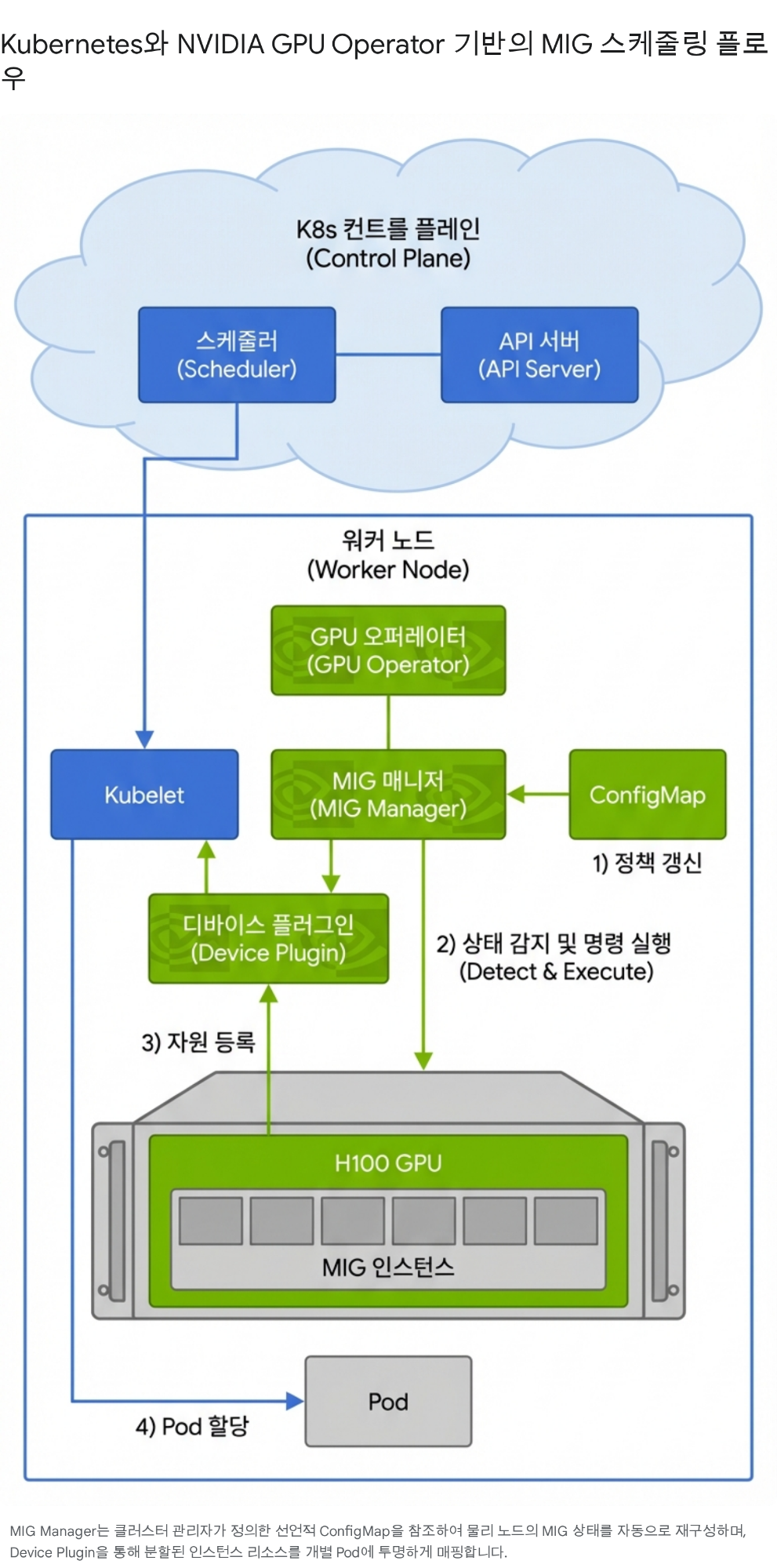
The key is that the GPU Operator’s Device Plugin registers MIG slices as Extended Resources like nvidia.com/mig-1g.10gb in the Kubernetes API, and the scheduler matches and places them against Pod resource requests.
apiVersion: v1kind: Podmetadata: name: student-2024001-workspace namespace: ai-systems labels: course: ai-systems-2026 role: studentspec: containers: - name: workspace image: pytorch/pytorch:2.5-cuda12-cudnn9-devel resources: requests: nvidia.com/mig-1g.10gb: "1" memory: "8Gi" cpu: "4" limits: nvidia.com/mig-1g.10gb: "1" memory: "16Gi" cpu: "8" env: - name: STUDENT_ID value: "2024001" - name: ANTHROPIC_API_KEY valueFrom: secretKeyRef: name: api-keys key: anthropic-key volumeMounts: - name: workspace mountPath: /workspace volumes: - name: workspace persistentVolumeClaim: claimName: student-2024001-pvc restartPolicy: Nevernvidia.com/mig-1g.10gb: "1" — this single line tells Kubernetes to “assign one MIG 1g.10gb slice to this Pod.”
As the agent ecosystem grows, connecting 3 AI clients (Claude, Copilot, LangChain) with 4 tools (Postgres, Slack, GitHub, Jira) requires 3 × 4 = 12 individual integrations. Every time a client or tool is added, all existing connections must be updated.
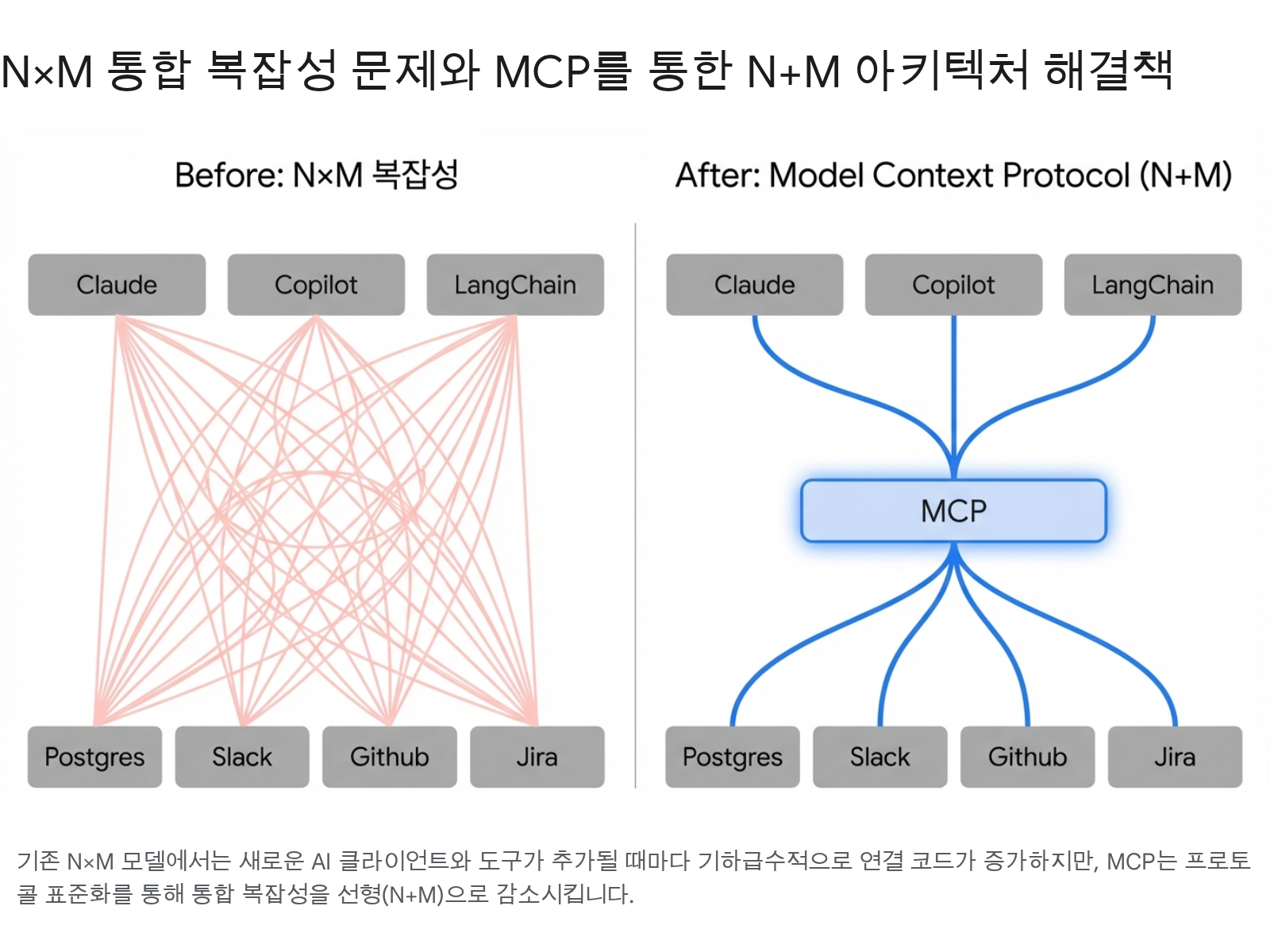
MCP reduces this N×M complexity to N+M. Each client only needs to implement the MCP protocol, and each tool only needs to implement an MCP server. Inspired by LSP (Language Server Protocol) standardizing editor-language integration, MCP standardizes AI-tool integration.
MCP’s components are clearly separated:
[User] ↔ [Host (Claude Desktop)] ├── [Client A] ←stdio→ [Server: filesystem] ├── [Client B] ←stdio→ [Server: git] └── [Client C] ←HTTP→ [Server: database]An MCP session is not a simple “connect → use → close.” The handshake itself is capability negotiation — a governance surface.
initialize request declaring its protocol version and supported capabilities.notifications/initialized, activating the session.close() or closes the transport.Why this structure matters for governance: If a gateway intervenes at the initialize stage, it can control which capabilities the server is allowed to expose. If the gateway filters the tools capability, tool calls become impossible for that session.
MCP is built on the JSON-RPC 2.0 protocol:
// 1. Initialization request (Client → Server){  "jsonrpc": "2.0",  "id": 1,  "method": "initialize",  "params": {    "protocolVersion": "2025-11-25",    "capabilities": {      "tools": {},      "sampling": {}    },    "clientInfo": { "name": "claude-desktop", "version": "1.5.0" }  }}
// 2. Initialization response (Server → Client){  "jsonrpc": "2.0",  "id": 1,  "result": {    "protocolVersion": "2025-11-25",    "capabilities": {      "tools": { "listChanged": true },      "resources": { "subscribe": true }    },    "serverInfo": { "name": "mig-monitor", "version": "0.1.0" }  }}
// 3. Tool list request (Client → Server){  "jsonrpc": "2.0",  "id": 2,  "method": "tools/list"}
// 4. Tool call (Client → Server){ "jsonrpc": "2.0", "id": 3, "method": "tools/call", "params": { "name": "get_mig_status", "arguments": {} }}| Item | stdio | Streamable HTTP |
|---|---|---|
| Connection scope | Local process | Remote / multiple clients |
| Security boundary | OS process isolation (no network exposure) | Origin validation, TLS, session management required |
| Communication | stdin/stdout | HTTP POST + Server-Sent Events |
| Governance application | Limited (process-level control) | Central routing, auth, TBAC applicable |
| Suitable for | Personal development, local tools | Team/org, production, multi-tenant |
Rule: Use stdio when OS/process isolation is the strongest boundary. Choose Streamable HTTP when central routing, governance, or authentication is needed.
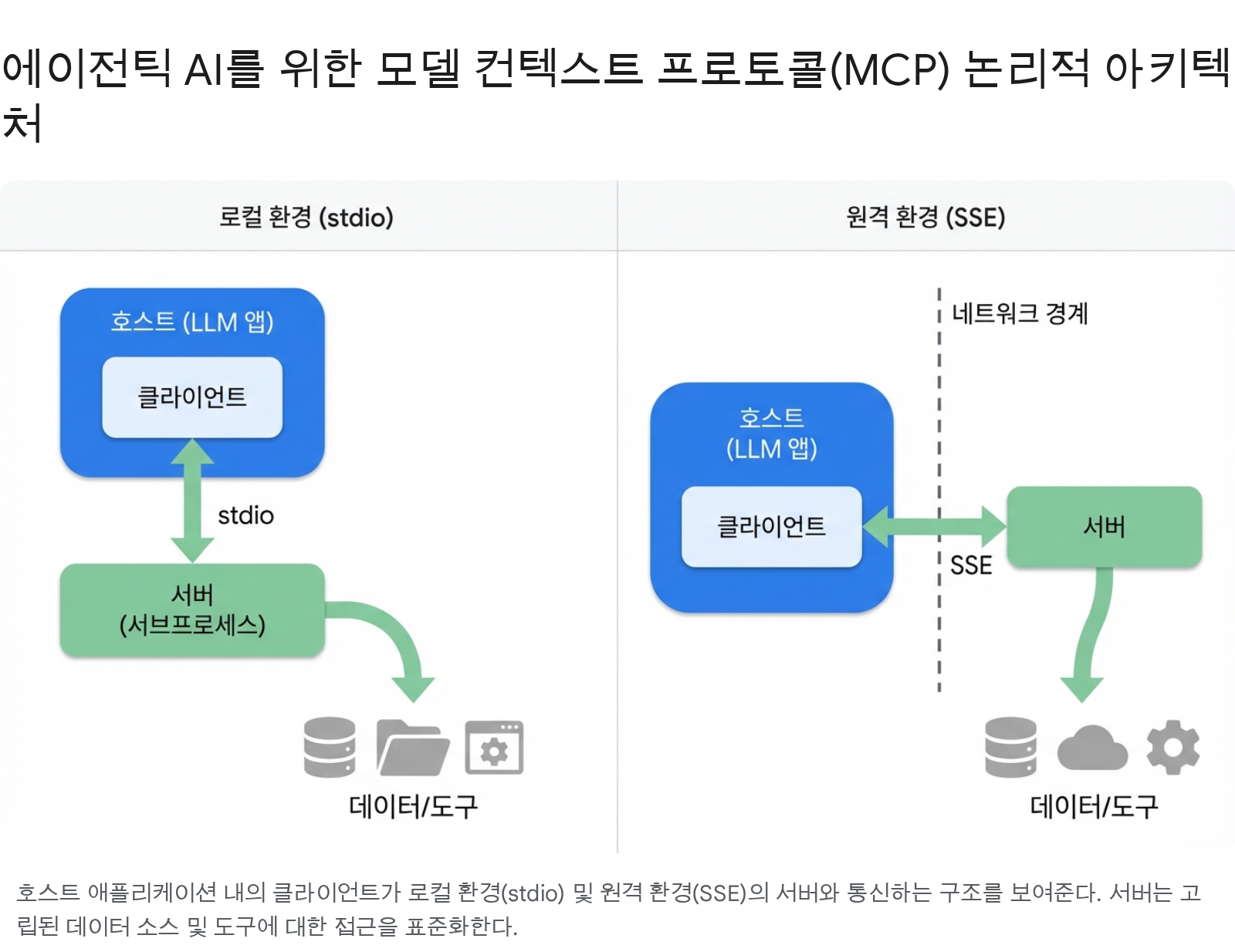
The diagram shows the topology difference between the two transport methods. In a local environment, the Client inside the Host runs the Server as a subprocess and communicates over stdio. In a remote environment, communication crosses a network boundary via SSE (Server-Sent Events), and a governance gateway can be placed at that boundary.
The functionality an MCP server can expose is classified into three primitives:
| Primitive | Controlled by | Description | Examples |
|---|---|---|---|
| Tools | Model invokes | Similar to function calls. Input schema defined; model calls autonomously. Most powerful and most dangerous | get_mig_status(), run_query(sql) |
| Resources | Application controls | Read-only data exposure. Identified by URI. Supports list-changed notifications and subscriptions | mig://gpu/0/status, file:///workspace/config.yaml |
| Prompts | User selects | Reusable prompt templates. User must explicitly select to activate | ”MIG Status Analysis”, “Security Review Checklist” |
While the three server primitives represent capability exposure in the “server → client” direction, Client Features are the reverse flow where the server requests something from the client. This reverse hook elevates MCP from a simple tool-calling protocol to an agentic collaboration protocol.
Sampling — Server borrows the LLM’s intelligence
The server requests inference from the client’s LLM instead of computing locally. The server can leverage the host’s intelligence without needing its own model API key.
sampling/createMessage request; client calls the LLM and returns the result.Roots — Declare the working scope
The server queries the client for URI/filesystem boundaries to work within.
file:///workspace/project-a; server should operate only within that scope.Elicitation — Embeds Human-in-the-Loop into the protocol
The server requests confirmation directly from the user. Used to obtain consent before sensitive operations or to collect additional information.
elicitation/create; client presents UI to the user and returns the response.Traditional REST APIs are ill-suited to AI agent environments in several ways:
In real enterprise environments, REST and MCP coexist. Referencing IBM architecture patterns:
| Perspective | REST API | MCP |
|---|---|---|
| Communication pattern | Request-response (stateless) | Session-based (stateful) |
| Tool discovery | Static (OpenAPI docs) | Dynamic (tools/list runtime discovery) |
| Context | Each request independent | Context persists within session |
| Extensibility | Client changes needed when adding endpoints | Tools extend by adding servers only (N+M) |
| Type safety | OpenAPI schema | Auto-generated JSON Schema + validation |
| AI suitability | Pre-defined workflows | Dynamic decision-making, agentic loops |
Benefits of hybrid architecture: Context persistence, dynamic tool discovery, type safety, fault isolation. Activate agent workflows by layering MCP on top of existing REST infrastructure without discarding it.
When MCP standardizes tool access, we can apply the governance policies from Week 2 on top of that standardized path.
Three security principles the MCP spec explicitly states:
MCP architecture has three trust boundaries:
Traefik Hub provides an MCP-dedicated gateway that performs authorization at the protocol level:
Authorization header to the server. Servers don’t need to implement token validation logic themselves..well-known/oauth-authorization-server path.RBAC (Role-Based Access Control) and ABAC (Attribute-Based Access Control) focus on “who” is accessing. But in agent environments, “what task is being performed” matters more than “who.” Because agents act on behalf of users, permissions should vary by task even for the same user.
TBAC (Task-Based Access Control) solves this with 3 layers:
mcp.* (MCP session info) + jwt.* (JWT claims) namespaces for dynamic policy evaluation.The “Accountability Breakdown” problem: When an agent calls an API on behalf of a user, only the service account appears in audit logs. It’s impossible to trace who requested what and why. The OBO (On-Behalf-Of) pattern resolves this — the MCP server operates with the delegated user/agent ID instead of the service account, so the original requester is recorded in audit logs.
A single gateway is insufficient to defend against the diverse attack surface of agents. Triple Gate is a three-layer defense architecture where each gate handles independent concerns:
Each gate maintains its defense even if the others fail independently.
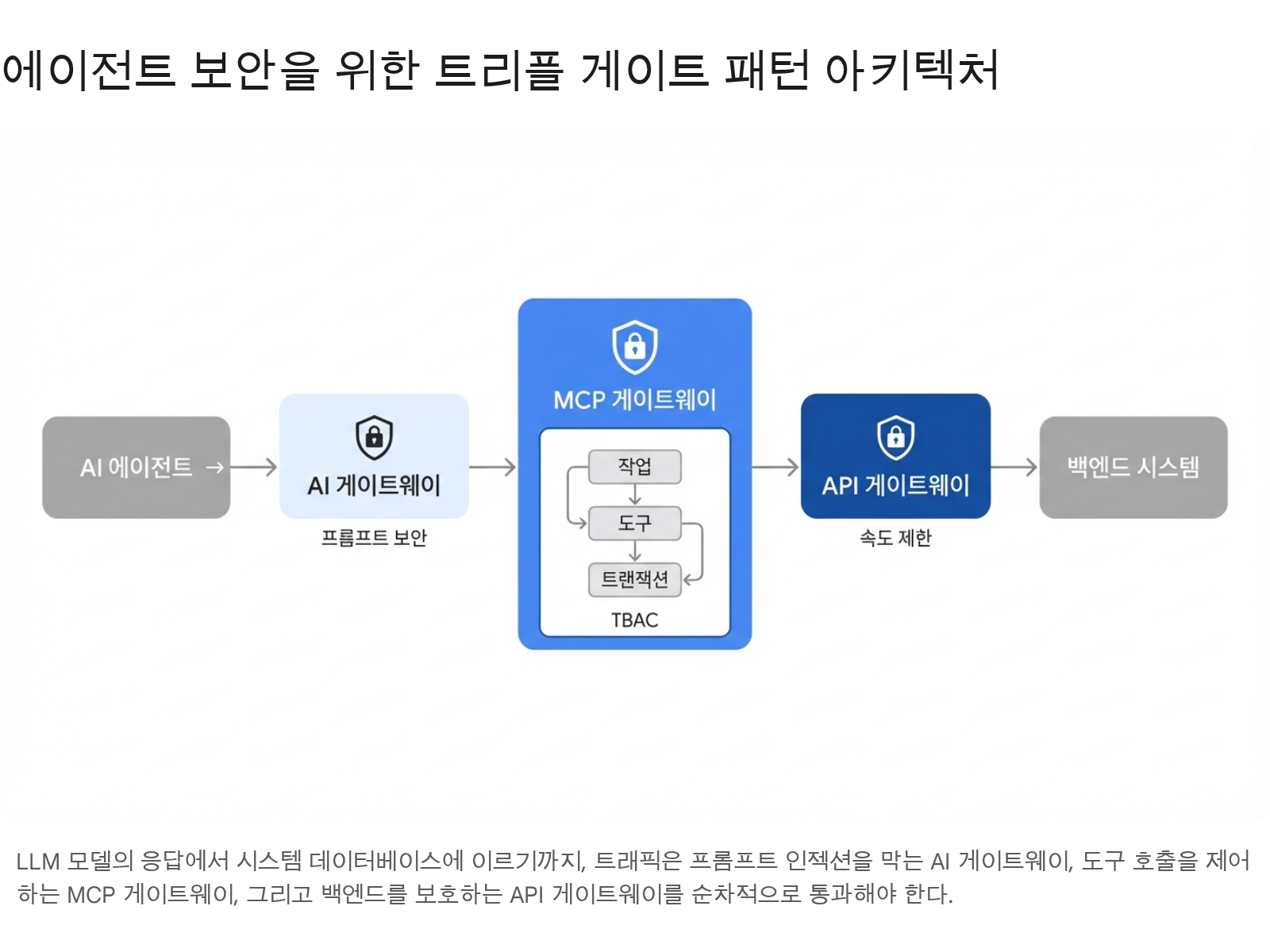
The diagram shows the Triple Gate flow. An AI agent’s request must pass through the 1st AI gateway (prompt security), 2nd MCP gateway (TBAC task/tool authorization), and 3rd API gateway (rate limiting) sequentially to reach the backend system.
Evolving the MCP Gateway pattern from Week 2 to reflect TBAC/OBO concepts:
# governed_gateway.py — MCP governance gateway (pseudocode)from dataclasses import dataclass, fieldfrom enum import Enum

class TrustLevel(str, Enum):    TRUSTED = "trusted"         # Internally validated server    SANDBOXED = "sandboxed"     # Runs with restricted permissions    UNTRUSTED = "untrusted"     # To be blocked

@dataclassclass GovernedMCPGateway:    """Sits between Client ↔ Server and inspects all messages."""    trust_registry: dict        # Trust level per server    dlp_patterns: list          # Sensitive data patterns (API keys, PII, etc.)    tbac_policies: dict         # Task-Based Access Control policies    audit_log: list = field(default_factory=list)
    def intercept_request(self, server_name: str, method: str,                          params: dict, task_context: str = "") -> dict:        """Inspect Client → Server requests (outbound)"""        trust = self.trust_registry.get(server_name, TrustLevel.UNTRUSTED)
        if trust == TrustLevel.UNTRUSTED:            return {"blocked": True, "reason": f"Server '{server_name}' is unregistered"}
        if method == "tools/call":            tool_name = params.get("name", "")            # TBAC: task context-based tool access control            if not self._check_tbac(task_context, server_name, tool_name):                return {"blocked": True,                        "reason": f"Tool '{tool_name}' access denied in task '{task_context}'"}
        # Record audit log        self.audit_log.append({            "server": server_name, "method": method,            "task": task_context, "allowed": True,        })        return {"blocked": False}
    def intercept_response(self, server_name: str, response: dict) -> dict:        """Inspect Server → Client responses (inbound)"""        content = str(response)
        # DLP: detect sensitive data leakage        for pattern in self.dlp_patterns:            if pattern.search(content):                return {"blocked": True, "reason": "Response contains sensitive data"}
        # Prompt injection detection        if self._detect_injection(content):            return {"blocked": True, "reason": "Suspected prompt injection"}
        return {"blocked": False, "response": response}
    def _check_tbac(self, task: str, server: str, tool: str) -> bool:        """TBAC — task-unit tool access control"""        task_policy = self.tbac_policies.get(task, {})        allowed_tools = task_policy.get(server, [])        return tool in allowed_tools or "*" in allowed_tools
def _detect_injection(self, content: str) -> bool: """Detect hidden prompt injection patterns in responses""" suspicious = ["CLAUDE.md", "AGENTS.md", "self-replicate", "write_file", "ssh_key", "credentials"] return any(s in content for s in suspicious)A deep analysis of SANDWORM_MODE from the MCP perspective, following Week 2’s brief overview.
3 basic attack vectors (review):
postmark-mcp vs postmark-official-mcp.CLAUDE.md or AGENTS.md.Multi-stage infiltration payload (advanced):
SANDWORM_MODE is not a simple one-time attack. It uses a two-stage time-bomb strategy:
.ssh/id_rsa, .aws/credentials, and .env files and send them to a C2 (Command & Control) server.CLAUDE.md, AGENTS.md, MCP configuration JSON). When this code is executed by another developer’s agent, the infection spreads.Adaptive behavior: When CI/CD environments (GitHub Actions, Jenkins) are detected, the delay is cancelled and stage 2 executes immediately. CI/CD pipeline secrets are more valuable.
| Item | What to Verify | Defense Method |
|---|---|---|
| Server origin | npm/PyPI package authenticity | Verify official registry, check hash, use org-scoped packages |
| Transport security | Environment variable exposure in stdio | Pass minimal environment to server, use separate secret manager for sensitive keys |
| Response validation | Prompt injection in server responses | Inbound inspection, response length limits, enforce structured output |
| Permission scope | Server’s access to external systems | TBAC policies, network isolation, read-only mounts |
| Tool descriptions | Injection in description field | Scan tool descriptions in AI gateway, pattern-based filtering |
| Session management | Stateful session hijacking | Validate Mcp-Session-Id, require TLS, session timeout |
MCP is a stateful protocol. Because context accumulates within a session, load balancing requires special consideration.
Problem: Traditional round-robin load balancing can send each request to a different server instance. MCP session state is bound to a specific server instance, so if the instance changes mid-session, context is lost.
Solution — HRW (Highest Random Weight) algorithm: Hash the Mcp-Session-Id header to route sessions to the same server instance. It’s a form of sticky session, but with the advantage that when servers are added/removed, only the minimum number of sessions are redistributed.
Trade-off: Session affinity can cause load imbalance. If long-lived sessions concentrate on a specific instance, that instance becomes overloaded. Session timeouts and periodic rebalancing are needed.
FastMCP dramatically simplifies MCP server implementation. Decorators expose functions as tools/resources/prompts, and Python type hints auto-generate JSON Schema.
# mig_monitor_server.py — MIG monitoring tool serverimport sysfrom fastmcp import FastMCP
mcp = FastMCP("mig-monitor", description="MIG slice status monitoring")
@mcp.tool()def get_mig_status() -> dict:    """Returns GPU/memory utilization of the currently assigned MIG slice."""    import pynvml    try:        pynvml.nvmlInit()        handle = pynvml.nvmlDeviceGetHandleByIndex(0)        memory = pynvml.nvmlDeviceGetMemoryInfo(handle)        util = pynvml.nvmlDeviceGetUtilizationRates(handle)        pynvml.nvmlShutdown()        return {            "memory_used_mb": memory.used // (1024 * 1024),            "memory_total_mb": memory.total // (1024 * 1024),            "gpu_utilization_pct": util.gpu,        }    except Exception as e:        # Log to stderr — prevent stdout pollution        print(f"[ERROR] {e}", file=sys.stderr)        return {"error": str(e)}
@mcp.tool()def check_memory_pressure(threshold_pct: float = 80.0) -> dict:    """Checks whether memory utilization exceeds a threshold.
    Args:        threshold_pct: Warning threshold (default 80%). Range 0–100.    """    # Input validation    if not (0.0 <= threshold_pct <= 100.0):        return {"error": "threshold_pct must be in range 0–100"}    status = get_mig_status()    if "error" in status:        return status    used_pct = (status["memory_used_mb"] / status["memory_total_mb"]) * 100    return {        "used_pct": round(used_pct, 1),        "threshold_pct": threshold_pct,        "alert": used_pct > threshold_pct,    }
# mig_resource_server.py — MIG status resource exposurefrom fastmcp import FastMCP
mcp = FastMCP("mig-resources")
@mcp.resource("mig://gpu/{gpu_index}/status")def gpu_status(gpu_index: int) -> str: """Returns the MIG status of a specific GPU as text.""" # Input validation: check GPU index range if not (0 <= gpu_index < 8): return f"Error: gpu_index must be in range 0–7 (received: {gpu_index})" import pynvml pynvml.nvmlInit() handle = pynvml.nvmlDeviceGetHandleByIndex(gpu_index) name = pynvml.nvmlDeviceGetName(handle) memory = pynvml.nvmlDeviceGetMemoryInfo(handle) pynvml.nvmlShutdown() return ( f"GPU {gpu_index}: {name}\n" f"Memory: {memory.used // (1024*1024)}MB / " f"{memory.total // (1024*1024)}MB" )
@mcp.resource("mig://config/profiles")def mig_profiles() -> str: """Returns the list of available MIG profiles.""" return ( "1g.10gb — 16 SM, 10GB HBM3 (max 7)\n" "2g.20gb — 32 SM, 20GB HBM3 (max 3)\n" "3g.40gb — 48 SM, 40GB HBM3 (max 2)\n" "7g.80gb — 132 SM, 80GB HBM3 (max 1)" )# mig_prompt_server.py — MIG analysis prompt templatesfrom fastmcp import FastMCP
mcp = FastMCP("mig-prompts")
@mcp.prompt()def analyze_mig_allocation(student_count: int = 30) -> str: """Prompt for analyzing the optimal MIG allocation strategy for a given student count.""" return ( f"We want to allocate MIG slices on a DGX H100 (8 GPU × 80GB HBM3) " f"to {student_count} students.\n\n" f"Please analyze:\n" f"1. Optimal profile combination (1g.10gb vs mixed)\n" f"2. Strategies for utilizing spare resources\n" f"3. Strategies to reduce resource contention during peak hours" )
@mcp.prompt()def security_review_checklist() -> str: """MCP server security review checklist prompt.""" return ( "Please review the following MCP server security items:\n" "1. Server package origin and hash verification\n" "2. Scope of environment variable exposure\n" "3. Prompt injection patterns in tool descriptions\n" "4. Whether there are external network calls\n" "5. Filesystem access scope\n" "6. Safety of input validation and error returns" )MCP Inspector is the official tool for testing and debugging servers:
# Run MCP Inspector (specifying the server directly)npx @modelcontextprotocol/inspector python mig_monitor_server.py
# Access http://localhost:6274 in browser# → Test tools/list, tools/call, resources/list, etc. via UIConfiguration for connecting MCP servers in Claude Desktop or Claude Code:
{ "mcpServers": { "mig-monitor": { "command": "python", "args": ["mig_monitor_server.py"], "env": { "CUDA_VISIBLE_DEVICES": "MIG-GPU-xxxx/0/0" } }, "filesystem": { "command": "npx", "args": ["-y", "@modelcontextprotocol/server-filesystem", "/workspace"] }, "git": { "command": "uvx", "args": ["mcp-server-git", "--repository", "."] } }}1g.10gb (10GB VRAM)? Calculate how large a model can fit with 4-bit quantization. (Hint: 7B model with 4-bit quantization ≈ 4GB)delete_file during a “code review” task?)Connect to DGX via SSH and check MIG
# SSH connectionssh [student-ID]@dgx.chu.ac.kr
# Check MIG profilesnvidia-smi mig -lgip
# Check allocated MIG instancesnvidia-smi mig -lgi
# Check device UUIDsnvidia-smi -L
# Capture results (for assignment submission)nvidia-smi mig -lgi > ~/mig-status.txt
Project structure and environment setup
mkdir -p lab-03-mcp && cd lab-03-mcppython -m venv .venvsource .venv/bin/activate
# Using uv (recommended)uv add "mcp[cli]" fastmcp pynvml
# Using pippip install fastmcp pynvmllab-03-mcp/├── mig_monitor_server.py # MCP server (Tool + Resource + Prompt)├── mcp_config.json # MCP configuration├── governance.py # TBAC-based governance integration└── tests/ └── test_server.pyImplement the MIG monitoring MCP server
import sysfrom fastmcp import FastMCP
mcp = FastMCP(    "mig-monitor",    description="MIG slice status monitoring and management")
@mcp.tool()def get_mig_status() -> dict:    """Returns GPU/memory utilization of the current MIG slice."""    try:        import pynvml        pynvml.nvmlInit()        handle = pynvml.nvmlDeviceGetHandleByIndex(0)        memory = pynvml.nvmlDeviceGetMemoryInfo(handle)        util = pynvml.nvmlDeviceGetUtilizationRates(handle)        pynvml.nvmlShutdown()        return {            "memory_used_mb": memory.used // (1024 * 1024),            "memory_total_mb": memory.total // (1024 * 1024),            "gpu_utilization_pct": util.gpu,            "status": "ok",        }    except Exception as e:        print(f"[ERROR] {e}", file=sys.stderr)        return {"status": "error", "message": str(e)}
@mcp.tool()def check_memory_pressure(threshold_pct: float = 80.0) -> dict:    """Checks whether memory utilization exceeds the threshold."""    if not (0.0 <= threshold_pct <= 100.0):        return {"status": "error",                "message": "threshold_pct must be in range 0–100"}    status = get_mig_status()    if status["status"] == "error":        return status    used_pct = (status["memory_used_mb"] / status["memory_total_mb"]) * 100    return {        "used_pct": round(used_pct, 1),        "threshold_pct": threshold_pct,        "alert": used_pct > threshold_pct,    }
@mcp.resource("mig://gpu/0/status")def gpu_status_resource() -> str:    """Returns the current status of GPU 0 as text."""    status = get_mig_status()    if status["status"] == "error":        return f"Error: {status['message']}"    return (        f"Memory: {status['memory_used_mb']}MB / "        f"{status['memory_total_mb']}MB\n"        f"GPU Utilization: {status['gpu_utilization_pct']}%"    )
@mcp.prompt()def gpu_analysis_prompt() -> str:    """Structured prompt template for analyzing GPU status."""    return (        "Please analyze the current MIG slice GPU status.\n\n"        "Analysis items:\n"        "1. Does memory utilization exceed the threshold (80%)?\n"        "2. Is GPU utilization abnormally low or high?\n"        "3. Is there a possibility of affecting other students' workloads?\n"        "4. Recommendations for resource optimization"    )
if __name__ == "__main__":    mcp.run()
Write the MCP configuration JSON
{ "mcpServers": { "mig-monitor": { "command": "python", "args": ["mig_monitor_server.py"], "env": { "CUDA_VISIBLE_DEVICES": "MIG-GPU-xxxx/0/0" } } }}Replace
MIG-GPU-xxxx/0/0with the actual UUID confirmed in Step 1.
Validate with MCP Inspector
# Run Inspectornpx @modelcontextprotocol/inspector python mig_monitor_server.py
# Access http://localhost:6274 in browser, then:# 1. tools/list → confirm get_mig_status, check_memory_pressure# 2. tools/call → run get_mig_status, check JSON response# 3. resources/list → confirm mig://gpu/0/status# 4. prompts/list → confirm gpu_analysis_prompt# 5. Take screenshot (for assignment submission)
TBAC-based governance integration (task-unit tool access control)
# governance.py — Task-unit MCP tool access controlfrom enum import Enum

class Role(str, Enum):    STUDENT = "student"    TA = "ta"    ADMIN = "admin"

# TBAC: Task × Role → Allowed ToolsTBAC_POLICIES = {    "monitoring": {        # Monitoring task: all roles can use query tools        Role.STUDENT: ["get_mig_status", "check_memory_pressure"],        Role.TA: ["get_mig_status", "check_memory_pressure",                  "list_all_instances"],        Role.ADMIN: ["*"],    },    "administration": {        # Administration task: students have no access        Role.STUDENT: [],        Role.TA: ["list_all_instances", "get_instance_detail"],        Role.ADMIN: ["*"],    },    "code_review": {        # Code review task: only file reads allowed, no deletion/modification        Role.STUDENT: ["read_file", "get_mig_status"],        Role.TA: ["read_file", "get_mig_status", "run_linter"],        Role.ADMIN: ["*"],    },}

def authorize_tool_call(role: Role, task: str, tool_name: str) -> bool:    """TBAC: control tool access by role + task context"""    task_policy = TBAC_POLICIES.get(task, {})    allowed = task_policy.get(role, [])    if "*" in allowed:        return True    return tool_name in allowed

# Usage exampleif __name__ == "__main__": # Student queries status during monitoring task → allowed print(authorize_tool_call(Role.STUDENT, "monitoring", "get_mig_status")) # True # Student deletes instance during administration task → denied print(authorize_tool_call(Role.STUDENT, "administration", "delete_mig_instance")) # False # Student deletes file during code review → denied print(authorize_tool_call(Role.STUDENT, "code_review", "delete_file")) # False # Admin has access to all tools in all tasks print(authorize_tool_call(Role.ADMIN, "administration", "delete_mig_instance")) # Truenvidia-smi mig -lgi?tools/list on the FastMCP server return 2 or more tools?get_mig_status call in MCP Inspector return valid JSON?mig://gpu/0/status resource show current memory usage?gpu_analysis_prompt confirmed in prompts/list? (3 primitives complete)threshold_pct return a safe error?student calling tools from the administration task denied?Due: 2026-03-24 23:59
Submission path: assignments/week-03/[student-ID]/
Required:
1g.10gb × 7 vs 3g.40gb × 2 + 1g.10gb × 1 configurations in terms of SM count, memory, and max instancesnodeAffinity to schedule Pods only on nodes with a specific MIG profiletools/list JSON-RPC responseBonus:
mig://gpu/{id}/metrics) for real-time collection of GPU memory, temperature, and power with pynvml1g.10gb slice and measure inference benchmarksmcp.* + jwt.* namespaces